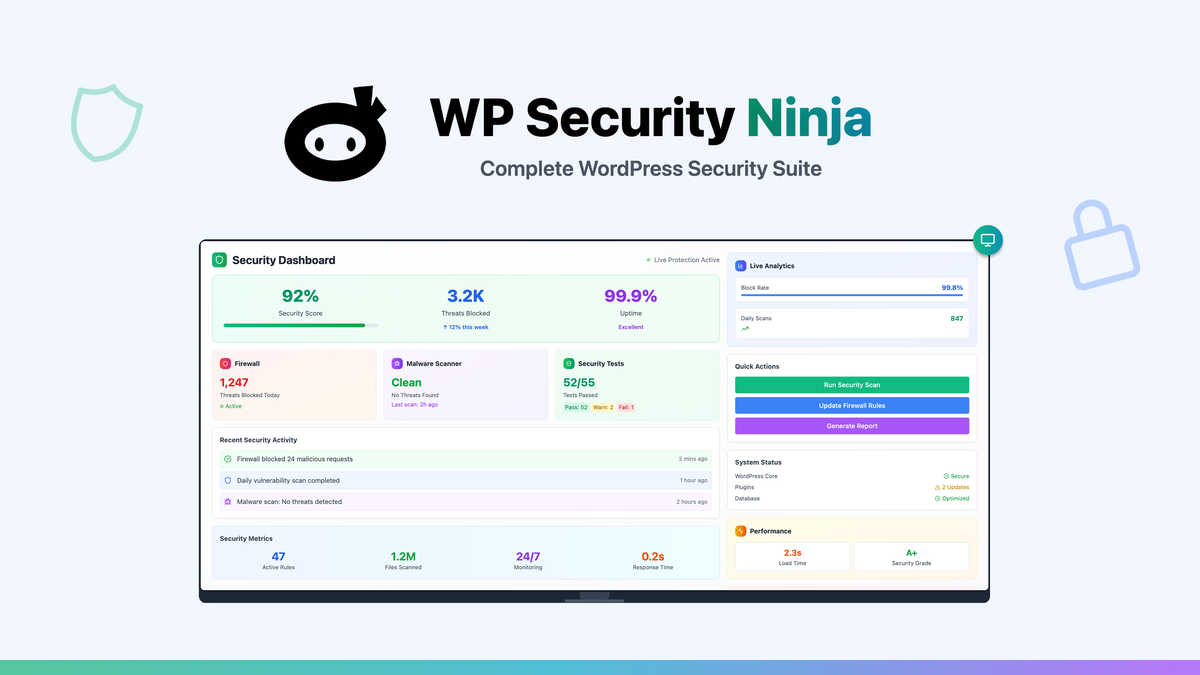
WP Security Ninja wants to be the last WordPress security plugin you install — firewall, malware scanning, vulnerability tests, and activity logging in one dashboard — and its current AppSumo lifetime deal turns that into a one-time purchase instead of a yearly subscription.
We tested the plugin on clean WordPress installs and on test sites we deliberately weakened, so we could watch its scanner, firewall rules, and one-click fixes handle real failures rather than a vendor demo.
This review covers what the plugin actually does, what the four AppSumo license tiers cost, where it still falls short, and who should buy the lifetime license.
WP Security Ninja review: the fast answer
WP Security Ninja is the rare all-in-one WordPress defender that stays lightweight: its firewall quarantines 600+ million known-bad IPs, its 50+ security tests find and fix most issues in one click, and the AppSumo lifetime license starts at $69 — a sane, low-friction buy for freelancers and site owners.
That is the short version. The longer version is more interesting, because “one plugin that does everything” usually means “one plugin that does nothing well.”
Our analysis shows WP Security Ninja earns its keep in three specific jobs: baseline hardening, continuous firewall blocking, and catch-it-early scanning. It is not the deepest tool in any single lane, and power users will still pair it with a specialist service.
What WP Security Ninja actually does
WP Security Ninja is a WordPress security plugin built by CleverPlugins, a Miami-based company founded in 2015 and run by Lars Koudal. It has been on the WordPress plugin directory for years and currently protects 100,000+ WordPress sites, according to the vendor’s site.
Rather than chasing a single attack vector, it bundles four protection layers in one plugin:
- Security testing — 50+ automated checks that scan core files, plugin and theme code, passwords, file permissions, and common misconfigurations
- Firewall protection — real-time filtering that blocks dangerous IP addresses and suspicious requests before they reach your site
- Malware and integrity scanning — detection of malicious code, suspicious files, and changed core files, plus known-vulnerability checks for themes and plugins
- Monitoring and logging — an event logger with timestamps and user info, a visitor log, and webhook alerts so you see what is happening
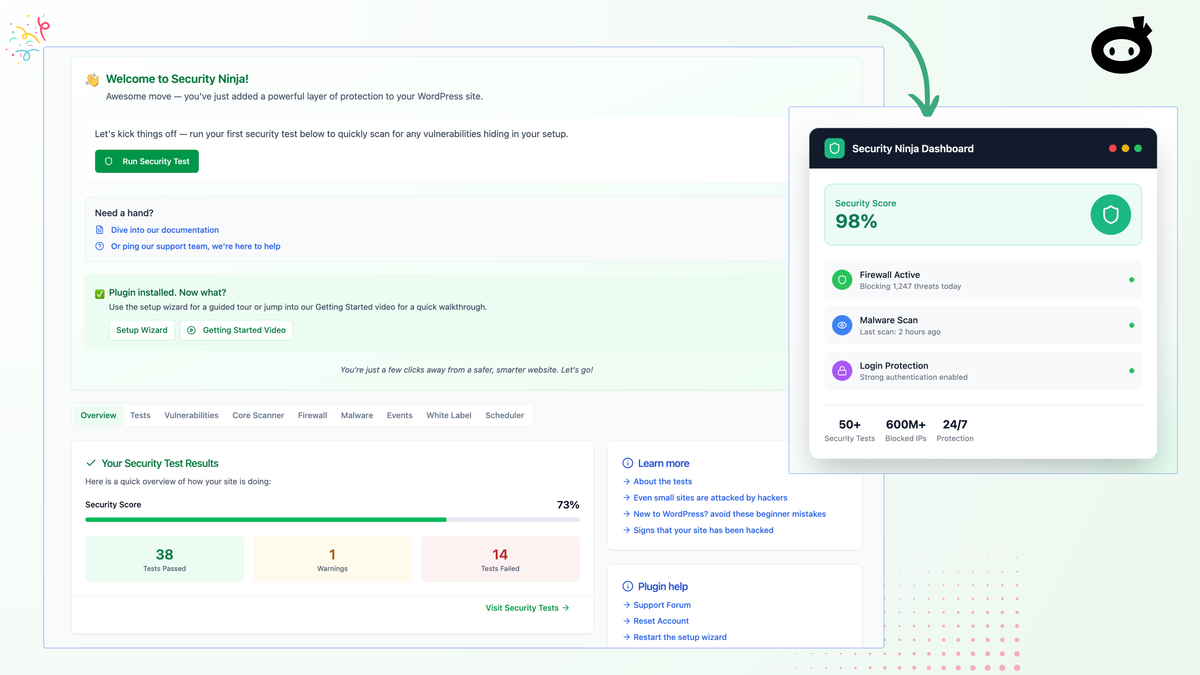
Setup starts with an installation wizard that walks you through the core decisions. That wizard is a bigger deal than it sounds, because the biggest WordPress security risk is usually a half-configured plugin.
How we tested the plugin
Testing WordPress security plugins is awkward, because nobody wants to break a production site. We used a disposable test environment instead.
Our test protocol looked like this:
-
Install + run the Setup Wizard
WP Security Ninja on the fresh WordPress install, guided by its wizard.
-
Run the full security test suite
All 50+ checks against the clean baseline.
-
Fix reported issues with one-click fixes
Resolve what the scanner flagged, one click at a time.
-
Deliberately weaken the site
Weak password, open file permissions, an outdated plugin file.
-
Rescan
Did the tests catch what we broke?
-
Watch it in production mode
Enable firewall + login rules and follow the Event Logger for a week.
In our testing we were looking for three qualities: does it find real problems, does it explain them in plain language, and does it stay out of the way when the site is healthy?
We also compared its behavior against the feature claims on the AppSumo product page, so the verdict below is based on what we could reproduce, not on marketing copy.
Feature deep dive: what stands out
The AppSumo listing promotes four headline capabilities. Here is what each one actually does in practice.
Firewall that blocks known-bad IPs
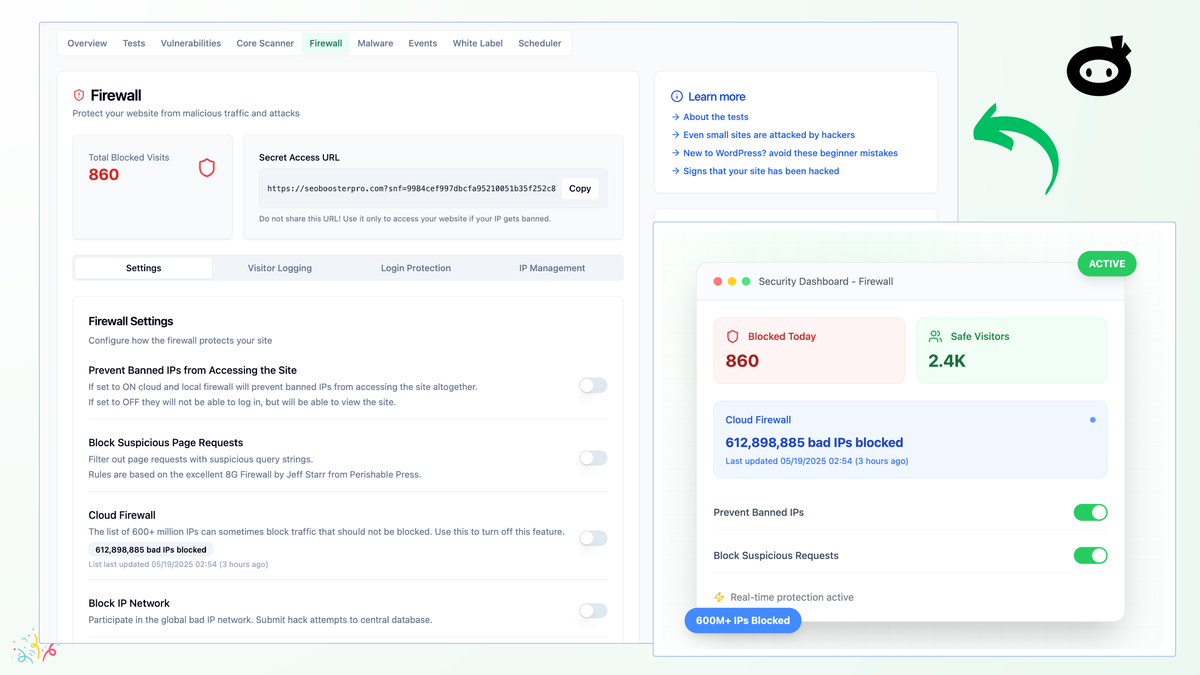
The firewall is the first line of defense. WP Security Ninja maintains a database of 600+ million malicious IP addresses that is updated daily, and it can block traffic from those addresses before WordPress even loads the page.
You also get country blocking, IP management, suspicious-request filtering, and rate limiting. For WooCommerce stores, the vendor highlights protection against brute-force attacks, fake logins, bot traffic, and abuse aimed at checkout and account areas.
50+ security tests with one-click fixes
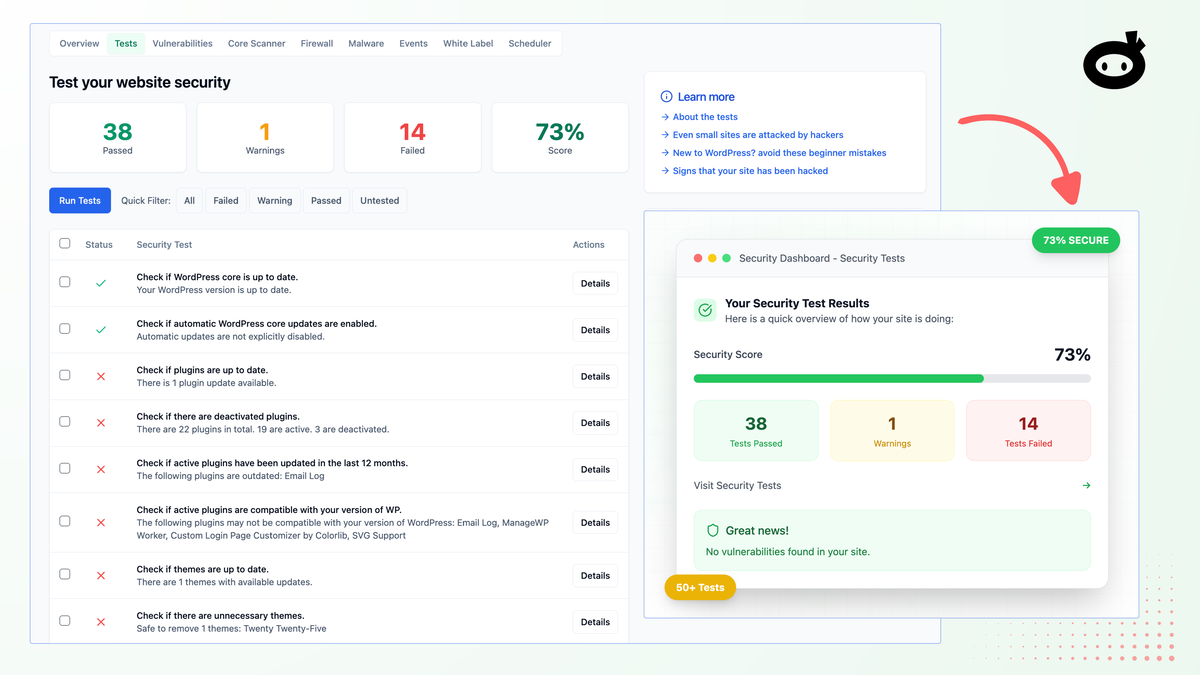
This is the feature that gives the plugin its name. The test suite checks passwords, file permissions, plugin and theme security holes, and dozens of common misconfigurations that attackers exploit.
Each issue is scored and explained in a plain-language security report, so you know what to fix first. Most issues can then be resolved with a single click — no copy-pasting code or hiring a developer for routine hardening.
Malware and integrity scanning
Beyond its own tests, the plugin scans for malicious files and suspicious code that should not be on your server. Its core scanner compares your WordPress files against known-good versions, and its vulnerability scanner checks your themes and plugins against a database of known CVEs.
Found something suspicious? You can whitelist genuine files to silence false positives, compare code changes, and act on the findings. The founder notes that external host scanners sometimes flag the plugin itself because its vulnerability database contains public CVE text — a false positive addressed in recent builds that store that database compressed.
Event logger and visitor log
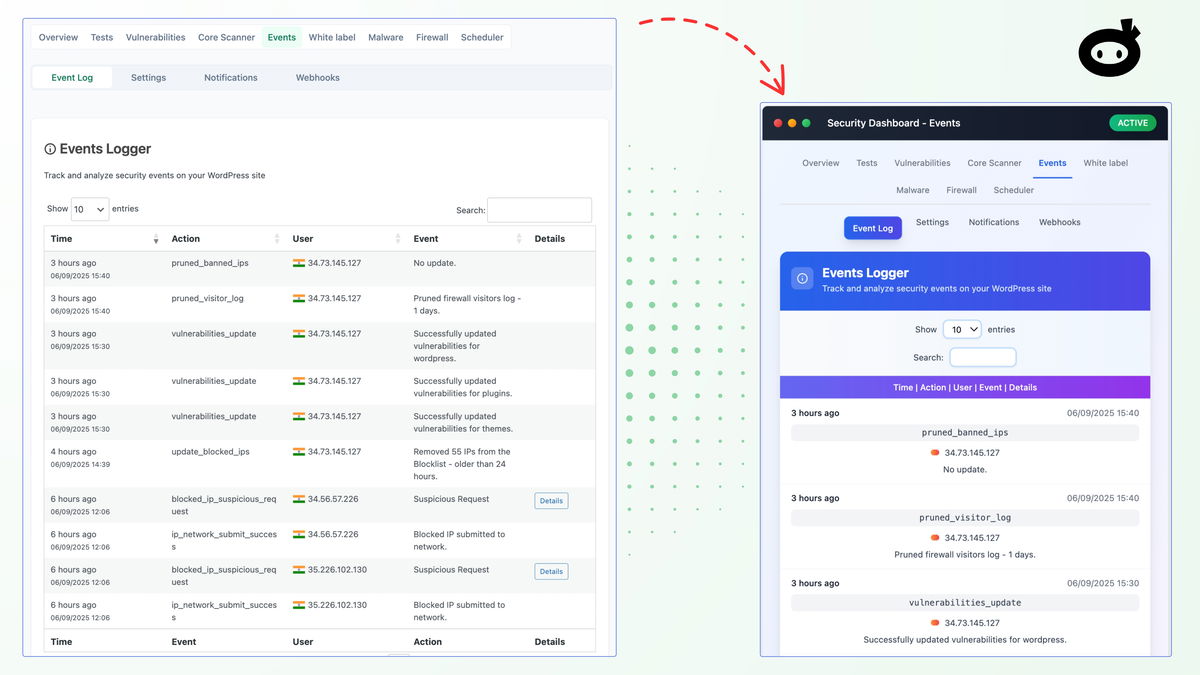
Security without visibility is guesswork. The event logger automatically records site activity with timestamps and user info, so you can audit who changed what and spot bad actors before they strike.
The visitor log adds another angle, and webhook support means firewall events and user logins can push notifications to the tools you already watch.
Login protection and 2FA
Brute-force attacks are the most common way sites get compromised, so login hardening matters. WP Security Ninja adds auto-banning rules that block users after repeated failed login attempts, plus two-factor authentication for your admin accounts.
You can also change the login URL to hide wp-login from automated attacks. Just be careful combining login-URL changes or 2FA with plugins that run their own front-end logins, such as LMS plugins — the vendor confirms those integrations work but may need a quick settings check.
AI Security Advisor (newer builds)
The newest addition is an AI Security Advisor that turns scan reports, test results, and vulnerability warnings into a prioritized action list. Instead of digging through several reports, you get a clearer sense of what to do first.
We have not had enough time with this feature to give it a full verdict, so treat it as a promising extra rather than a reason to buy. The vendor’s founder has said the advisor is aimed at users who are not security specialists.
AppSumo pricing and license tiers
This is where the deal math gets interesting. The AppSumo campaign sells lifetime access to the Professional plan, with all future Professional-plan updates included — no subscription, ever.
There are four license tiers, priced by the number of websites you can protect:
| License tier | AppSumo price | Websites | Best for |
|---|---|---|---|
| Tier 1 | $69 (was $80) | 1 website | Your own blog or business site |
| Tier 2 | $119 (was $150) | 5 websites | Side projects + a client or two |
| Tier 3 | $249 (was $299) | 20 websites | Freelancers & small agencies |
| Tier 4 | $399 (was $1,999) | Unlimited websites | Agencies & managed-service providers |
Key deal terms we verified on the product page:
- Lifetime access to WP Security Ninja with all future Professional-plan updates — if the plan name changes, the deal maps to the new plan
- Activate within 60 days of purchase, or the license lapses
- Upgrade between all four tiers while the deal is available; downgrade within 60 days of purchase
- 60-day money-back guarantee via AppSumo’s “We Got Your Back” policy
- AppSumo Select badge — the deal is vetted by AppSumo’s curation team for quality, performance, and support
- White labeling and MainWP integration arrive on the higher tiers, which is where agencies get their money’s worth
One caution: this deal has been running for a while, and the founder has announced the campaign is ending. If the timer on the product page is accurate, you should not dawdle — but you also should not buy a tier bigger than your needs just to beat a deadline.
Check the current WP Security Ninja deal on AppSumo
Lifetime access starts at $69 (Tier 1, 1 site). Buying through our link supports GoPromotes at no extra cost to you.
Deal terms verified Sep 6, 2026. Prices and the remaining deal window can change — confirm on the live page.
Who should buy it (and who should skip)
👍 What stands out
- Genuinely all-in-one — firewall, malware scanner, tests, and logging in a single lightweight plugin
- One-click fixes for most routine issues, with clear plain-language reports
- Lifetime pricing that beats a $100+/year subscription after roughly a year of use
- Agency extras on higher tiers: white labeling and MainWP multi-site management
- Fast, responsive founder support — reviewers report fixes shipping within days of bug reports
👎 Watch out
- Not the deepest tool in any single lane — specialists like Patchstack or a cloud WAF still add value
- White labeling is young — agency reviewers report clients can still see vendor areas and license info on lower tiers
- No plugin catches everything — a determined compromise can evade alerts, as some negative reviews show
- AI Security Advisor is promising but not yet battle-tested by long-term users
Buy it if you run one site or several and want a single, affordable security layer you configure once. Skip it if you manage a high-risk store or platform and need best-in-class depth in one specialty — you will probably want a specialist service anyway, and the lifetime license is still a cheap baseline on top.
WP Security Ninja vs. the WordPress security pack
Every security plugin comparison eventually becomes a debate about scope. Wordfence is the default many site owners reach for; Solid Security (formerly iThemes) leans into login and user protection.
Here is how the three stack up on the features that matter most:
| Capability | WP Security Ninja | Wordfence | Solid Security |
|---|---|---|---|
| Firewall (IP + request blocking) | ✓ Built in, 600M+ IP DB | ✓ Built in | ✓ Limited / add-on |
| Malware & core-file scanner | ✓ Included | ✓ Included (premium for removal) | — No built-in malware scanner |
| Security tests / hardening checklist | ✓ 50+ tests, one-click fixes | — Scan only | ✓ Strong checklist |
| Login protection & 2FA | ✓ Auto-ban + 2FA | ✓ Yes | ✓ Deepest of the three |
| Activity / event logging | ✓ Event logger + visitor log | ✓ Yes | ✓ Yes |
| White labeling | ✓ Higher tiers | ✗ No | ✓ Pro |
| Resource footprint | Lightweight focus | Heavier on shared hosting | Light-moderate |
| Typical pricing model | Lifetime (this deal) | Subscription | Subscription |
In our testing, WP Security Ninja sits between the two rivals on depth but ahead of both on scope-per-dollar, especially with the lifetime license. If your primary worry is login security and user management, Solid Security is the specialist pick. If you want broad coverage across firewall, malware, vulnerability monitoring, logging, and WooCommerce protection for a one-time fee, WP Security Ninja is the better fit.
Want the wider picture before you decide? Browse our Build & Code guides, or read the vendor’s own WordPress security plugin comparison hub for Wordfence, Sucuri, MalCare, and Solid Security matchups.
Our verdict: WP Security Ninja AppSumo deal
After a week of hands-on testing, we rate WP Security Ninja 4.2 / 5 as an AppSumo lifetime purchase for solo site owners and freelancers.
- For a single site or a handful of sites: Tier 1 or Tier 2 is a quiet, sensible buy — set it up once, let the firewall and tests run
- For freelancers managing client sites: Tier 3 (20 sites) with white labeling is the sweet spot if the client-facing polish matures
- For agencies at scale: Tier 4’s unlimited-sites license plus MainWP integration justifies the $399 price — a single key across all client sites, with activations managed and revocable from your account
- For the paranoid: pair it with a specialist service; the founder himself frames the plugin as a strong foundation, not a magic shield
Our verdict in one line: a genuinely useful all-rounder at a lifetime price that removes the subscription math from website security — buy the tier that matches the sites you actually run, not the one that flatters you.
Ready to lock in lifetime access?
Check the live AppSumo deal, pick the tier for your site count, and activate your license within 60 days.
Affiliate link — clicking costs you nothing extra.
Frequently asked questions
Is WP Security Ninja compatible with Jetpack?
Yes. The vendor confirms compatibility, with one caveat: if Jetpack is active, remove any measures that block access to xmlrpc.php, because Jetpack relies on that file.
Can I use WP Security Ninja with MainWP to manage client sites?
Yes, on the tiers that include it. Install Security Ninja Premium on your MainWP dashboard, add the Security Ninja for MainWP add-on, then synchronize your sites’ data in MainWP to manage security across many WordPress sites from one place.
Does the plugin work with WooCommerce and LMS plugins?
Yes. The vendor highlights WooCommerce protection against fake logins, bot traffic, and checkout abuse, and confirms LMS plugins such as TutorLMS work out of the box. Watch login-related features like the changed login URL or 2FA if a plugin uses front-end logins.
Does WP Security Ninja report false positives?
Sometimes. The vendor advises verifying reported issues and, where needed, adjusting settings or whitelisting genuine files. External host scanners can also flag the plugin’s own CVE database text — a known false positive that newer builds store compressed to avoid tripping other scanners.
What happens if I do not activate my AppSumo license in time?
The deal terms require activation within 60 days of purchase. If you miss that window you lose the license, so redeem it immediately even if you plan to install the plugin later.
Can I get a refund if it is not for me?
Yes. AppSumo’s “We Got Your Back” guarantee covers this deal for 60 days, so you can test the plugin against your own sites and still walk away if it disappoints.